Essential cookies only, Cookie Policy.
A step-by-step guided wizard that builds strong passwords together with parents, children, teens, and seniors. Plain language, no jargon, just safer accounts for everyone.
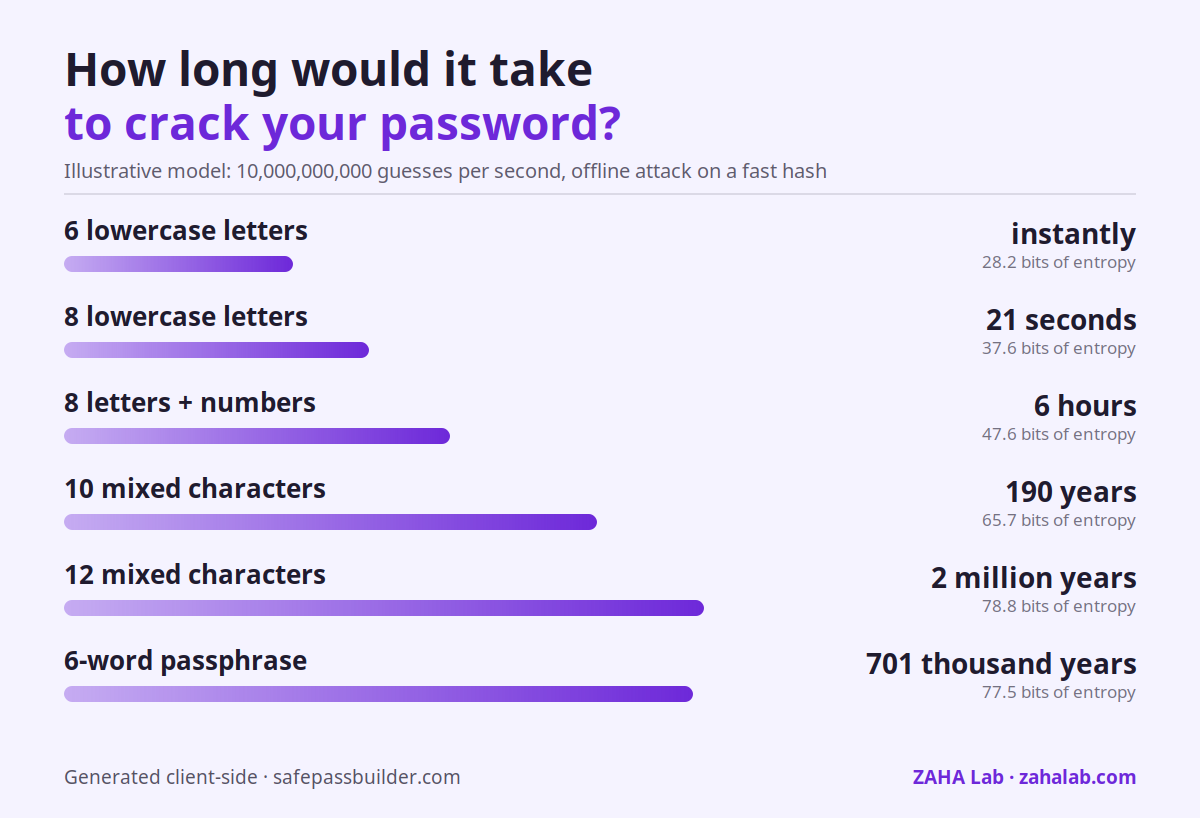
A short password falls instantly, however random it looks. The table and chart below model an offline attack at 10,000,000,000 guesses per second against a fast hash — the same maths a cracking rig actually runs.
| Password pattern | Time to crack | Entropy (bits) | Verdict |
|---|---|---|---|
| 6 lowercase letters | instantly | 28.2 | Weak |
| 8 lowercase letters | 21 seconds | 37.6 | Weak |
| 8 letters + numbers | 6 hours | 47.6 | Moderate |
| 10 mixed characters | 190 years | 65.7 | Moderate |
| 12 mixed characters | 2 million years | 78.8 | Strong |
| 6-word passphrase | 701 thousand years | 77.5 | Strong |
Assumes uniform random characters and no rate limiting. Password reuse or a breach database shortcut all of the above, which is why a unique password per account matters more than length alone.
Choose who it's for, pick the account type, generate, and learn how to keep it safe. Designed for every age.
Want to build another?
Every feature is tested to make sense to a 9-year-old and a 75-year-old alike.
Different presets for children, teens, adults, and seniors, each with explanations matched to that age group's understanding.
Each generated password comes with a plain-language explanation of why it's strong, turning a chore into a learning moment.
All generation uses crypto.getRandomValues() in your browser. We never see any password you generate. Ever.
No account, no subscription, no email. Open the page and start building. Works on any device your family uses.
Every preset meets or exceeds the current guidance from the NCSC and NIST. Sources: NCSC, NIST SP 800-63B.
| Preset | Generated length | NCSC guidance | NIST SP 800-63B | Account types |
|---|---|---|---|---|
| Child (under 12) | 12 characters | ✓ Meets | ✓ Meets minimum | School, gaming |
| Teen (12–17) | 16 characters | ✓ Exceeds | ✓ Exceeds minimum | Social media, email |
| Adult | 20 characters | ✓ Strongly exceeds | ✓ Strongly exceeds | All account types |
| Senior | 14 characters | ✓ Meets | ✓ Meets minimum | Email, shopping, banking |
| Email and banking accounts automatically add 4–6 extra characters to any preset. NIST SP 800-63B 2025 minimum: 15 characters. | ||||
Free family plan (6 users) or premium plan at £33/year. Open source, independently audited, zero-knowledge. The best value family password manager, everyone gets their own private vault plus a shared family folder.
Try Bitwarden Free →Polished, easy to use, and great for families with non-technical members. About £5.50/month for 5 users. Watchtower feature monitors saved passwords against breach databases automatically.
Try 1Password →Multi-device family antivirus with parental controls. Covers up to 5 devices including Windows, Mac, iOS, and Android. Includes safe browser and phishing protection.
Get Bitdefender →The guides and wizard on this site are written by Priya Raman, a hobbyist with a very keen interest in password security and online safety. All content is based on publicly available guidance from trusted sources, presented in plain language that any family member can follow.
All guidance on this site follows publicly available resources including NCSC Cyber Aware and Thinkuknow (CEOP) guidelines for parents and children.
About Priya Raman →Hardware and software recommendations verified by our team.
Hardware security key, phishing-proof 2FA for all your accounts.
Check price →Multi-device antivirus, VPN, and identity protection suite.
Check price →Whole-home VPN router, protect every connected device on your network.
Check price →As an Amazon Associate we earn from qualifying purchases.